
Fortnite is an Online Battle Royale game. As such, it is prone to face certain issues like many software of its nature. There could be errors like server issues, performance issues, etc. Speaking of performance issues, it’s annoying when the game stops performing well and ultimately hangs up. The game, your device, everything is slowed to a halt, and it’s frustrating to deal with. In this guide, I will show you how to fix the Application Hung Error in Fortnite.
How to Fix the Application Hung Error in Fortnite
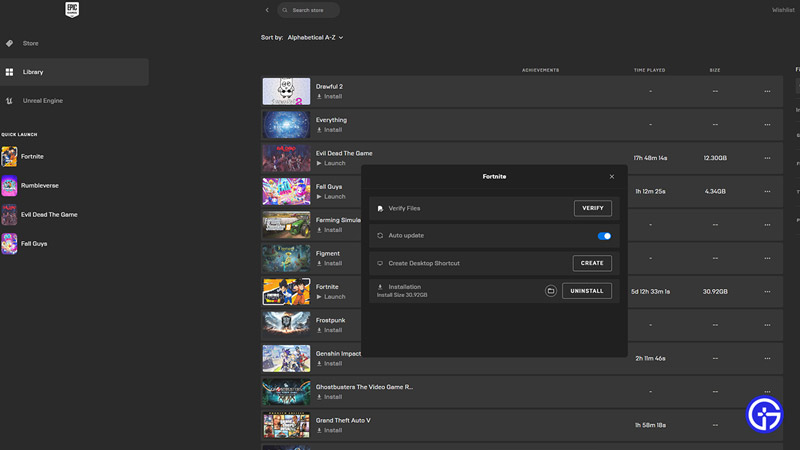
The Application has Hung Error occurs when certain files from Fortnite or your system is not read properly or has faced an issue while loading. As such, Checking these files is necessary. Here is what you will have to do.
- First, let’s open up Fortnite and change some settings.
- In Fortnite’s Settings, under the Video/ Advanced Graphic settings, you should be able to locate the DirectX version.
- If you have a high-end PC then set this option to DirectX 12.
- If you have a low-end PC then set this option to DirectX 11.
- After that, restart your game.
- Now, check if your GPUs & your OS are updated.
- You can check this by searching them individually and checking their version status.
- Whatever changes you do to them, make sure to restart your PC to ensure the changes are working.
- If the problem persists then you will have to verify the game’s files.
- To do this, open up Epic Games Launcher and go to your Library.
- Over here, select Fortnite and click on the 3 dots for more options.
- Now select Manage & then click on Verify Files.
- This will check if there are any corrupted game files & reinstall them.
- As such this may take some time but it will fix the Application Hung Error in Fortnite.
If you have done all of the Steps correctly, the error should no longer be there. This was all about fixing the Application Hung Error in Fortnite. Hopefully, this guide has helped you. You can also check out our other guides like Best Fortnite Edit Course Codes.











