Exploring Idyll becomes easier when you have enough supplies to catch and raise your Aniimo. You can capture creatures, Twine with them to take on their forms, explore the open world, battle, and grow your collection as you progress. Luckily, Gift codes provide Glimmer, Credits, Aniipods, and Growth Flowers to give you a useful boost from the start and here are the latest Aniimo codes and the rewards you can claim from each one.
Last checked for new codes on: October 9, 2026
All Aniimo Codes (October 2026)
- ANIIMOGIFT – Redeem this code to get 10 Glimmer, 20,000 Credits, 10 Growth Flower, and 5 Aniipod Pro.
- Aniimo2026 – Redeem this code to get 20 Glimmer.
- aniimowelcome – Redeem this code to get 50 Glimmer, 5 Aniipod Pro, and 5 Growth Flower.
- twinewithaniimo – Redeem this code to get 50 Glimmer, 5 Aniipod Pro, and 5 Growth Flower.
- anyoneaniimo – Redeem this code to get 5 Aniipod and 10,000 Credits.
- aniimoopenworld – Redeem this code to get 5 Aniipod and 10,000 Credits.
- aniimolaunch2026 – Redeem this code to get 5 Aniipod and 10,000 Credits.
- aniimoparty – Redeem this code to get 50 Glimmer, 5 Aniipod Pro, and 5 Growth Flower.
- aniimobonus – Redeem this code to get 50 Glimmer.
Expired Codes
- None as of now.
How to Redeem Aniimo Codes
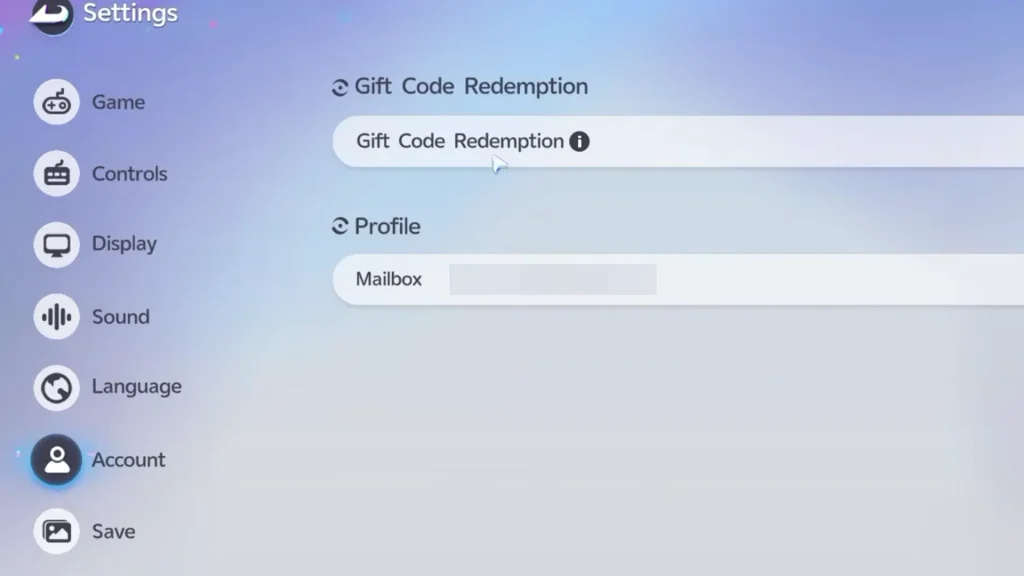
- Launch Aniimo and finish the early tutorial area. Make sure you have started the Chasing the Clouds main story quest.
- Then, open the pause menu while in the open world.
- Click the gear icon to open Settings.
- Select the Account tab.
- Choose Gift Code Redemption.
- Enter your code and click Redeem.
Your rewards will be sent to your in-game inventory or mailbox depending on the item.
What Do Aniimo Codes Give You?
The current codes mainly provide four types of rewards. Glimmer and Credits are currencies used during your adventure, while Aniipods and Aniipod Pro help you capture creatures. Growth Flowers are useful for raising your Aniimo.
How to Get More New Codes
Joining the Aniimo community (linked below) and checking the official social media channels is the best way to stay updated, or you can bookmark this article and check back after updates to find every new gift code in one place.
Why is My Code Not Working?
First, make sure to check the capitalization and spelling because codes must be entered exactly as provided. You should also make sure you have finished the early tutorial, as the redemption option is not immediately available.
FAQs
Yes, you can get join it via this server link.
Go to Settings > Account > Gift Code Redemption from the in-game menu.