Recently a lot of unlucky CS2 players have been experiencing issues while updating the game with a popup stating “An error occurred while updating Counter Strike 2 (missing executable)”. If you are also one of the affected ones, this guide will walk you through a few solutions you can try to fix this issue as quickly as possible and get your game back up and running.
How to Fix An Error Occurred While Updating Counter Strike 2 on Steam

The CS2 error “An error occurred while updating Counter Strike 2 (missing executable)” can be caused due to a lot of factors like missing game files, problems with the server, or administrator-related issues.
Below are the solutions you can perform on your device to possibly fix this error quickly.
Run Steam as an Administrator
The simplest way to fix such an error is by running the steam as administrator. This gives special access to the software, hence it works without any further issues.
- For this, exit the Steam app on your device.
- Now right-click on the Steam app shortcut, and then select Run as administrator.
Finally, you can try to download the update of the game again and check if the problem is still ongoing or fixed.
Change Steam Download Region
One of the common causes for this “An error occurred while updating Counter Strike 2 (missing executable)” problem can be due to server related issues, in such cases, you can fix this issue by changing your download region by following the below-given steps:
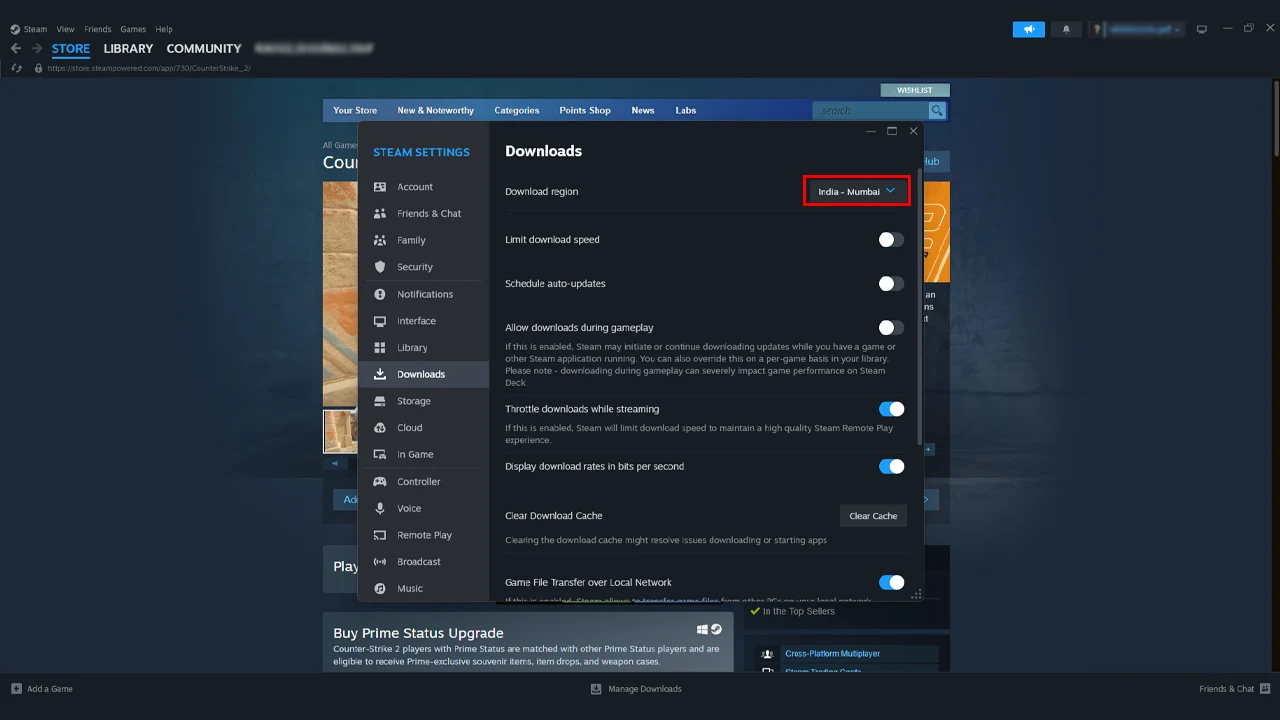
- First, open Steam on your device.
- Now, click on the Steam tab on the top bar.
- Further, go to Settings.
- Next, inside the Settings window, click on the Downloads tab from the list.
- Choose a different download region and relaunch the steam.
Now you can proceed to try again with updating to check if the fix worked.
Clear Steam Download Cache Data
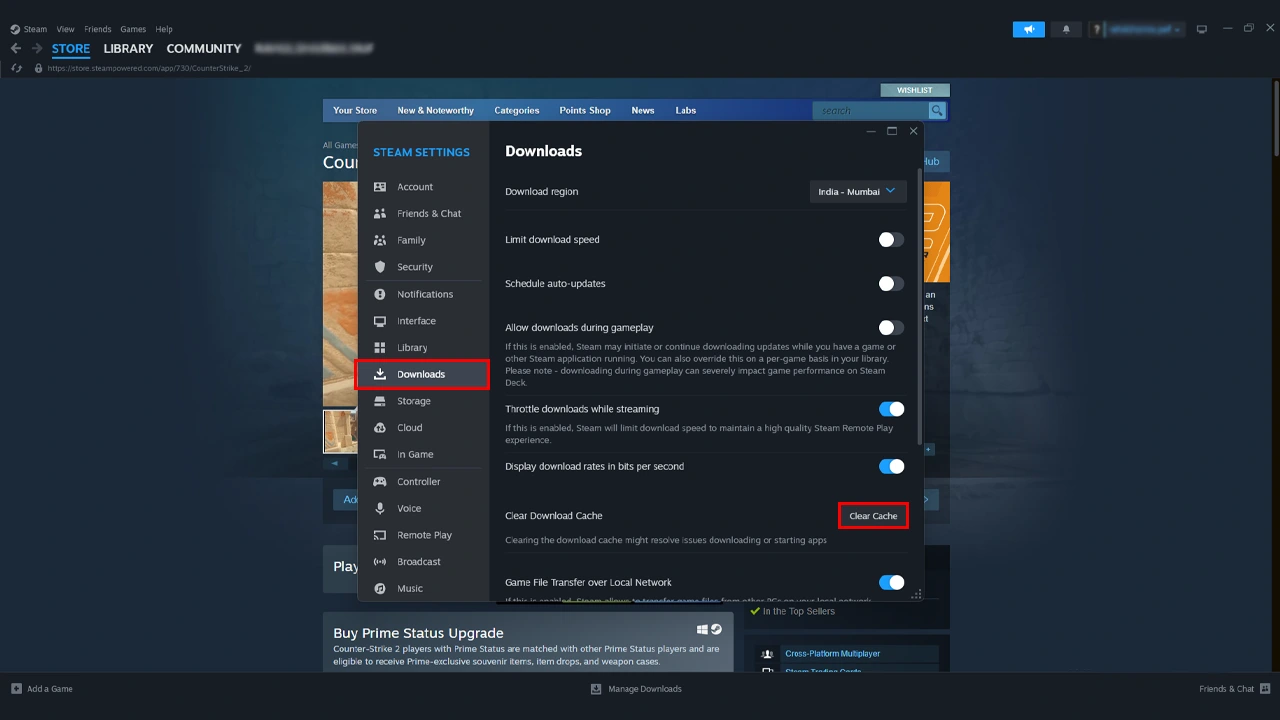
Now if the above solution doesn’t work for you, clearing the cache data can resolve such an issue, which could be related to space or some other. To clear the Steam download cache, follow the below-given instructions.
- First, open Steam on your device.
- Now, in Steam,
- For Windows, click on Steam on the above top tab, then click on Settings.
- For Mac, click on Steam, then click on Preferences.
- Further, inside the Settings window, click on the Downloads tab from the list.
- Next, inside the Download tab, under the Download Cache, click on Clear Download Cache.
- Further, click OK to confirm.
Once done, you can proceed to download the Counter Strike 2 update.
Reinstall Counter Strike 2
If none of the above methods work for you, the best you can do in this case is to uninstall the game completely from your device and then download a fresh new copy of the game through Steam.
- Open the Steam and go to the library.
- Now right-click on the game and go to manage.
- Further, in the manage menu, select Uninstall.
Once the game is completely uninstalled, you can proceed to download the game again.
If you are still stuck with the same issue after trying all the above solutions, the only possible thing you can do is reach out to Steam support for assistance. That’s everything you need to know on how to fix the “An Error Occurred While Updating Counter Strike 2” problem. If you find this article helpful, check out more guides, tips, and tricks on this game on our Counter Strike 2 dedicated sections right here on Gamer Tweak.