Home > Battlefield 2042 > How To Equip And Change Attachments In Battlefield 2042

How To Add And Change Attachments In Battlefield 2042 | How The Plus System Works

Published Date :

Battlefield 2042 Beta and the other games in the series are all high-paced action games. So when you are in the middle of a battle and need to change your weapon attachments, you should be able to do it quickly. That is exactly what this game provides with the help of the new Plus System. So in this guide let us take a look at how to add and change attachments in Battlefield 2042 Beta to customize weapons and how the new plus system works.

How to Equip & Change Attachments in Battlefield 2042 Beta Using Plus System
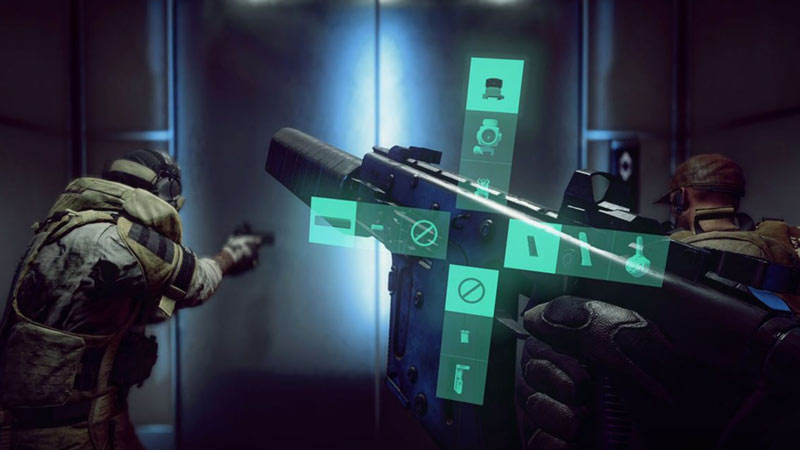
battlefield 2042 customize weapons by equipping and changing attachments

This is the way to add or change attachments in Battlefield 2042 Beta.

  • Xbox: Press and hold LB on your Xbox controller. Use the directional buttons on the D-pad to Equip or change the available attachments. Once you are all set release the LB button.
  • PlayStation: Press and hold L1 on your PlayStation controller. Equip or change the available attachments and use the directional buttons on the D-pad. Once you are done customizing your weapon release the L1 button.
  • PC: Press and hold the T-Key. Once the plus menu appears left click on all the attachments you wish to equip or change. Release the T-Key from your keyboard once done, to play with the weapon you just modified.

If you are playing using a controller, there is a chance that directional buttons don’t work for you. If that is the case simply use the ABXY buttons For Xbox, A-button works as down, B as right, X as left, and Y as up. PlayStation users can use Square, Triangle, Circle, and X that works as left, top, right, bottom respectively.

How To Customize Weapon in Battlefield 2042

You can customize your weapon by simply using the Plus System. Customizing your weapon is nothing but adding or changing attachments of the weapon you have currently equipped.

That sums up this guide on how to equip and change attachments in BF 2042. If you like playing this game be sure to check out our other guides like crashing on Startup or fixes for unable to connect error in Battlefield 2042.
  • GTA 6 Players in Australia May Need Age Verification Due to New Online Safety Rules

    GTA 6 Players in Australia May Need Age Verification Due to New Online Safety Rules

    Published Date :

    Australian players could have an extra requirement to meet before accessing Grand Theft Auto VI’s online features. Under the country’s updated online safety regulations, games classified as R18+ may need to verify that players are adults instead of relying on a simple age confirmation (as per news.com.au). If GTA 6 falls under those requirements, Rockstar… Read More

  • Tactical Swat Simulator Codes (July 2026)

    Tactical Swat Simulator Codes (July 2026)

    Published Date :

    This action-packed game is all about completing objectives, clearing the area, and stopping hostile suspects, and while you’re at it, you can earn plenty of cash. Luckily, Tactical SWAT Simulator codes also give you free Cash that can be put toward new gear and upgrades, helping you strengthen your loadout before heading back into the… Read More

  • Roblox Chameleon Codes (July 2026)

    Roblox Chameleon Codes (July 2026)

    Published Date :

    Meccha Chameleon’s virality is bringing similar games to Roblox, and this one’s called Chameleon! Blending into your surroundings is the key to staying hidden, but unlocking new cosmetics and customization options makes every match even more enjoyable. Roblox Chameleon codes give you free Coins that you can spend on new skins and other in-game items,… Read More

  • Reclone Codes (July 2026)

    Reclone Codes (July 2026)

    Published Date :

    Reclone is a sci-fi stealth horror game where you get on a research spaceship and survive the dangers that lurk. This means, you need all the boosts you can get which is exactly what Reclone codes provide! If you’re running short of Tokens or cash, make sure to redeem them quickly so that you have… Read More