Home > Gaming Guides > How To Disable Trainer In FIFA 23

How To Turn Off Trainer In FIFA 23

Updated Date :

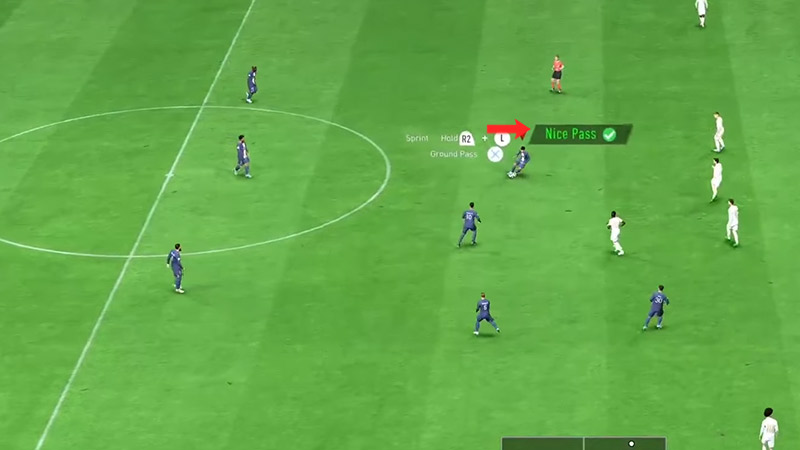
If you are a player who is learning the ropes in FIFA 23, then the Trainer feature can be quite a blessing. However, after a point in time, it can get a little distracting. This is much worse for hardcore FIFA players. Gameply feedback like the “Nice Pass “drives them insane. If you want to know how to disable this option, then you’re at the right place. Here is how to turn off Trainer in FIFA 23.

How to Turn Off Nice Pass & Trainer in FIFA 23
how to turn off nice pass in FIFA 23

Well, we can understand how annoying it is to constantly receive feedback whether you’re on or off the ball. You’re probably wondering how to turn off “Nice Pass” in FIFA 23 or “Nice first time shot”. For that, you will need to completely disable the Trainer. Here’s how to do it during a match and from the Main Menu:

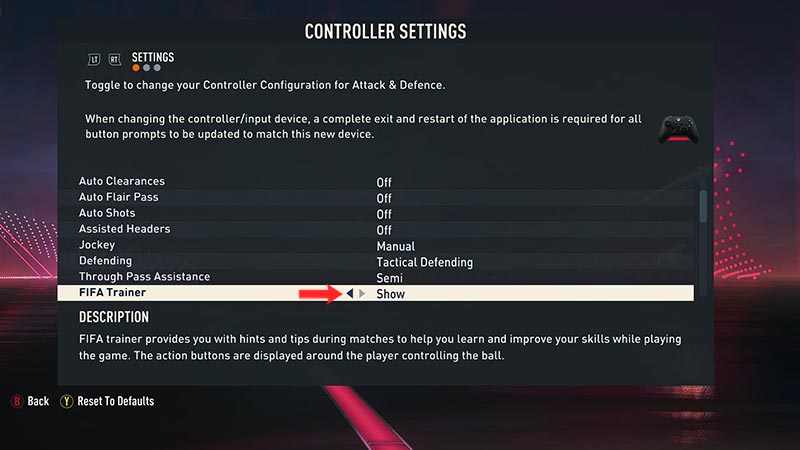
How to Turn Off Trainer via Main Menu [PC, PS4, PS5 & Xbox]
how to disable trainer in FIFA 23

  • First, head to the “Main Menu” screen of FIFA 23.
  • Now, select “Customise”.
  • Choose “Settings” and then “Customise Controls”.
  • Finally, scroll down until you see “FIFA Trainer”.
  • Toggle it from “Show” to “Hide”.

If you are already in a match and want to turn this annoying feature off, then here’s how you can do it:

During a Match
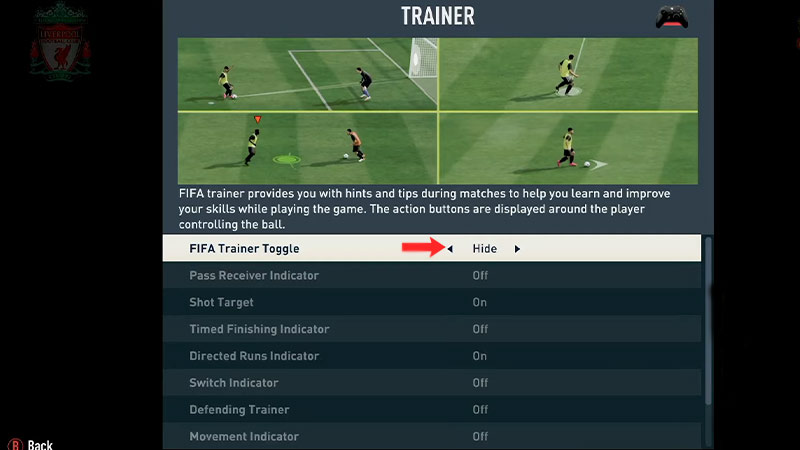
FIFA trainer toggle turn off FIFA 23

  • Pause the match that you’re currently playing.
  • Simply go to “Trainer”
  • Now, choose to “Hide” the “FIFA Trainer Toggle”

A bonus tip that I recommend is to keep the indicators that you want instead of turning off the entire Trainer option. Stuff like Shot Target which displays a shooting arrow, and the Timed Finishing Indicator can be extremely useful. If you prefer to have them turned on, then simply disable the indicators aren’t of any help to you.

That’s everything you need to know about how to Turn Off Trainer in FIFA 23. If you want to climb up the rank in FUT or ace the Career Mode, then head over to our dedicated FIFA 23 section.
  • Stream a Mukbang Codes (August 2026)

    Stream a Mukbang Codes (August 2026)

    Published Date :

    Mukbang games are gaining more popularity on Roblox these days, and Stream a Mukbang is where you eat food live, gain views, likes, followers, and earn cash for upgrades. As your live videos become more popular, you’ll need more resources to keep attracting new viewers, and that’s where free rewards can make a difference. Redeeming… Read More

  • Become an Anime Billionaire Codes (August 2026)

    Become an Anime Billionaire Codes (August 2026)

    Published Date :

    In Become an Anime Billionaire, you roll for anime characters, earn money, rebirth, climb the leaderboard and this journey becomes much easier when you have plenty of rewards. Thankfully, the developers release new Become an Anime Billionaire codes pretty regularly, such as free Units, Lucky Blocks, Cash, and more. Here’s the complete list of all… Read More

  • BikeLife Society Codes (August 2026)

    BikeLife Society Codes (August 2026)

    Published Date :

    Pulling off wheelies, upgrading your ride, and traveling across the city is what BikeLife Society is all about. As you unlock better bikes and customize them to match your style, you’ll need plenty of in-game resources to keep progressing. Free rewards can make that journey much easier, so it’s always worth redeeming the latest BikeLife… Read More

  • Coach a Fighter Codes (August 2026)

    Coach a Fighter Codes (August 2026)

    Published Date :

    In this boxing game, you don’t throw the punches yourself – you’re the coach who watches matches and helps train fighters. You’re tasked with upgrading your gym, improving your roster, and climbing through stronger leagues, which is why you’ll need every boost you can get. So, make sure to redeem these Coach a Fighter codes… Read More